
How SMM Panel Works (Complete Technical Guide 2026)
Everyone, from brands to creators, wants stronger visibility and faster engagement on social media. But achieving organically becomes impossible these days.
That is where SMM panels come in. These platforms allow users to buy services such as followers, likes, views, comments, and watch time from one dashboard.
Many people use panels without understanding the actual system behind them. But knowing how the SMM panel works helps you make smarter decisions.
This guide explains the full SMM panel working process in simple language. We will cover the technical side, APIs, child panels, delivery systems, business models, and safety tips.
What is an SMM Panel
An SMM panel is a platform where users can buy social media engagements at an affordable cost. It provides access to multiple services from a single dashboard. These services are primarily used by marketers, agencies, influencers, and resellers who want faster social media growth.
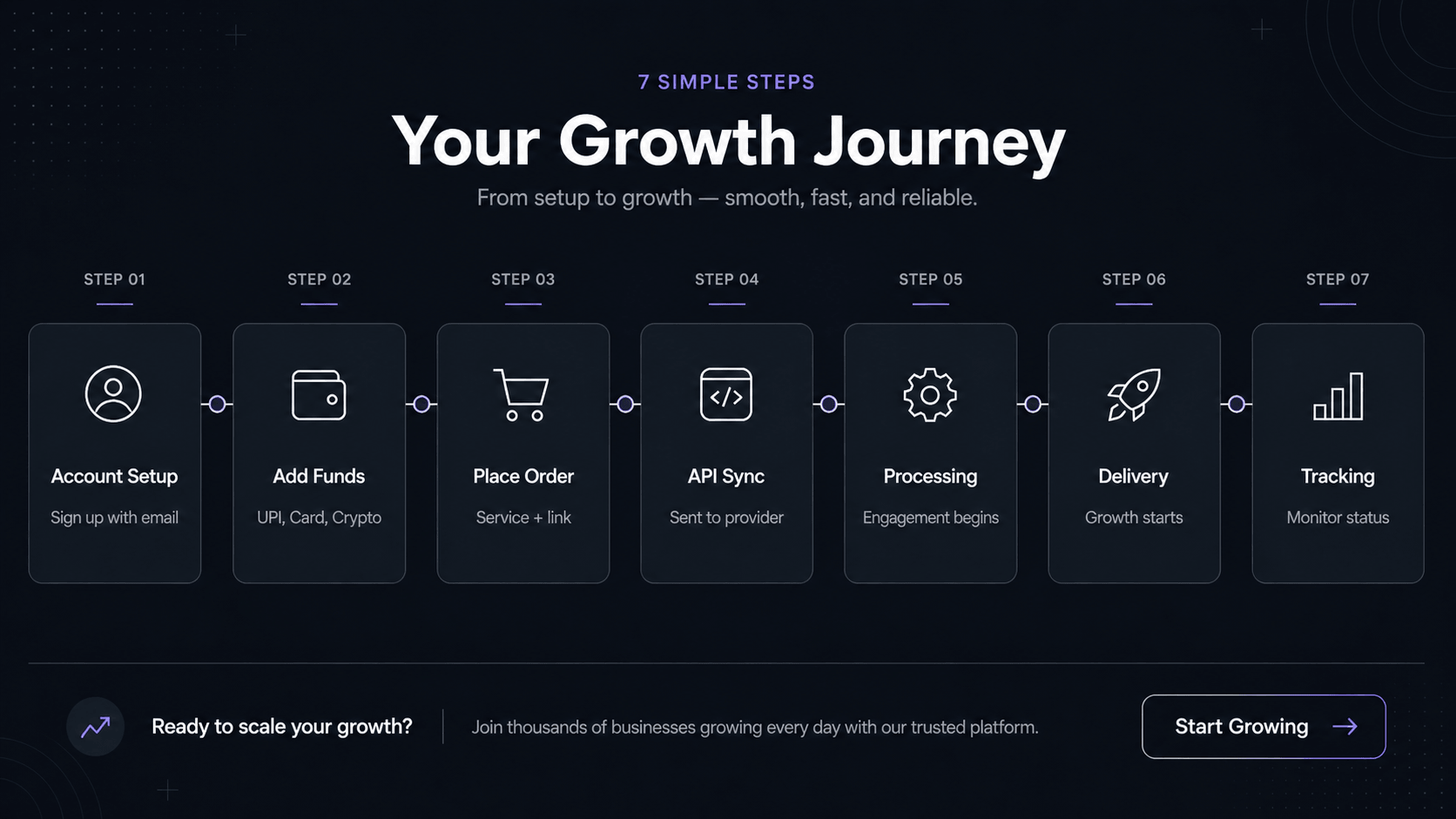
How SMM Panel Works (Step-by-Step Process)
Most SMM panels follow a simple workflow from registration to order delivery. Understanding how to use an SMM panel can help you navigate each step more effectively.
Step 1: User Registration and Account Setup
First, users create an account on the panel website using their name, email address, and password.
Step 2: Adding Funds to the Panel
Then, users need to add money to their panel’s wallet through UPI, Bank transfer, Crypto, Debit/Credit cards, PayPal, and Stripe.
Step 3: Selecting Service and Placing Order
After the fund is added, the user chooses the service categorized by platform (Instagram, YouTube, etc.) A typical order requires:
Particular Service (e.g., Instagram followers)
Link to the profile or post
Quantity (e.g., 1000 followers)
Agencies and resellers can save time by using the Mass Order feature to submit multiple orders simultaneously instead of placing them one by one.
Step 4: API Request Sent to Provider
Once the order is submitted, the panel sends the data via the API to the provider. This is where the technical part begins. The API carries: Service ID, Link, Quantity, and Order ID
Step 5: Order Processing by Provider Network
The provider receives the request and processes it using its own network. Then it starts the campaign using its internal traffic sources or engagement network.
Step 6: Delivery to Social Media Platform
Engagement begins appearing on the user’s profile or content. Followers increase, likes show up, or views start counting, depending on the order type.
Step 7: Order Completion and Status Tracking
At last, the panel updates the order status in real time.
Users can track status such as:
Pending
Processing
Partial
Completed
Cancelled
If there's an issue, support or refill options are usually available.
Behind the Scenes: How SMM Panel Actually Works
Role of API Connections
APIs are the backbone of any SMM panel system. They allow panels to automatically connect to multiple service providers. Instead of manual work, the panel sends and receives data through API calls. This makes the entire process fast and scalable.
Order Routing System
Not all services come from a single provider. Panels often connect to multiple sources.
The system decides:
Which provider offers the best price
Which one has faster delivery
Which service is currently active
Orders are routed accordingly without user involvement.
Automation and Cron Systems
Cron jobs are scheduled background tasks. They help panels automatically:
Update order status
Check balances
Sync services
Process refills
Detect failed orders
Without automation, manual management would be too slow.
Understanding the SMM Panel API System
What is an API in SMM Panel
API means Application Programming Interface. In SMM business terms, it is the bridge between the reseller panel and the provider panel. It allows automatic ordering without manual copy-paste work.
How API Integration Works
When a user places an order:
Panel collects order details
Sends data to the provider API
Provider accepts the request
Delivery starts
Status updates return to the panel
All of this usually happens in seconds.
Multiple Provider System Explained
Strong panels connect with multiple providers instead of one to:
- Avoid downtime
- Offer competitive pricing
- Ensure faster delivery
If one provider fails, another handles the job.
What is a Child SMM Panel
Definition of Child Panel
A child panel is a smaller panel connected to a main provider panel through API. It doesn’t have its own service infrastructure. Instead, it resells services from a parent panel.
How Child Panels Work
When a user places an order on a child panel:
- The order is sent to the main panel via API
- The main panel processes it
- Delivery happens as usual
Basically, the child panel acts as a middle layer.
Main Panel vs. Child Panel
Here are the key differences between the child panel and the main panel:
SMM Panel Business Model Explained
Reseller Model
Many people start by reselling services. They buy low-cost services from wholesale providers and resell them under their own brand at higher prices.
Wholesale vs Retail Panels
Wholesale panels mainly target resellers with low rates. Retail panels target creators and businesses with branding, support, and simpler dashboards.
Profit Margins in SMM Panel
Profit comes from the price difference.
For example:
- Buy 1,000 followers at $1.00
- Sell at $1.50
Profit = $0.50
Margins also depend on:
Traffic source cost
Competition
Payment gateway fees
Refund rates
Market demand
High-volume SMM panels often earn through small margins with many daily orders.
Features of a Good SMM Panel
Speed and Delivery Time
Best SMM panels start delivering orders on time and complete close to promised speed.
Refill and Drop Protection
Some services may drop later. That’s why good panels offer refill support and drop protection.
Drip Feed System
This feature splits large orders into smaller batches over time for safer delivery via drip feed feature.
API Reliability
Good panels have stable APIs, which means fewer failed orders and faster updates.
User-Friendly Dashboard
A clean dashboard saves time and makes it easier for users to manage multiple orders.
Is SMM Panel Safe to Use
Risks and Platform Policies
Social media platforms, like Instagram, don’t officially support paid engagement. Any kind of unnatural activity can raise flags. That’s why it is recommended to use the SMM panel safely. The result will be much better if you combine it with regular organic posting.
Best Practices to Use Safely
To use SMM panel safely:
Use smaller quantities first.
Choose gradual delivery.
Mix paid growth with real content strategy.
Avoid fake-looking spikes.
Use trusted providers with refill support.
Smart usage is safer than careless bulk ordering.
Conclusion
Now you may understand how the SMM panel works from both the user and technical sides.
The process is simple on the front end: add funds, place order, track status. But behind the scenes, APIs, provider systems, automation tools, and routing keep everything running.
Whether you’re a buyer or a reseller, understanding the SMM panel's working process helps you make better choices and avoid unnecessary tension.
FAQs
What is an SMM panel used for?
SMM panel helps you increase engagement, such as followers, likes, and views, on your post.
Are SMM panels legal to use?
Using an SMM panel is generally legal in many places. But buying engagement services may violate the platform's terms of service. Moderate and careful usage reduces chances.
How fast do SMM panel services deliver?
Some SMM services start within minutes, while others take hours, depending on the quantity.
Do SMM panels use real users or bots?
It depends on the provider. Some SMM services, like EasyToPomo, offer higher-quality engagement, while cheaper services may rely on low-quality sources.
Can SMM panels get my account banned?
Not always. However, using an SMM panel too aggressively or incorrectly can increase the risk of account restrictions or suspension.
Can I start my own SMM panel business?
Yes. You can launch a panel using APIs, or start as a reseller with minimal investment.