SMM Panel Start Count and Start Time Explained
Every order in your SMM panel history shows a small number called the start count. Most buyers ignore it, then panic when their follower count does not match what they ordered. That one number is the key to checking any order yourself.
This guide explains start count and start time in plain words, shows how to use them to check delivery, and lists what to do when an order has not started yet.
What Is Start Count?
Our FAQ defines it simply: "Start Count is the number of followers, likes, views, or other engagement your account or post had when the order began."
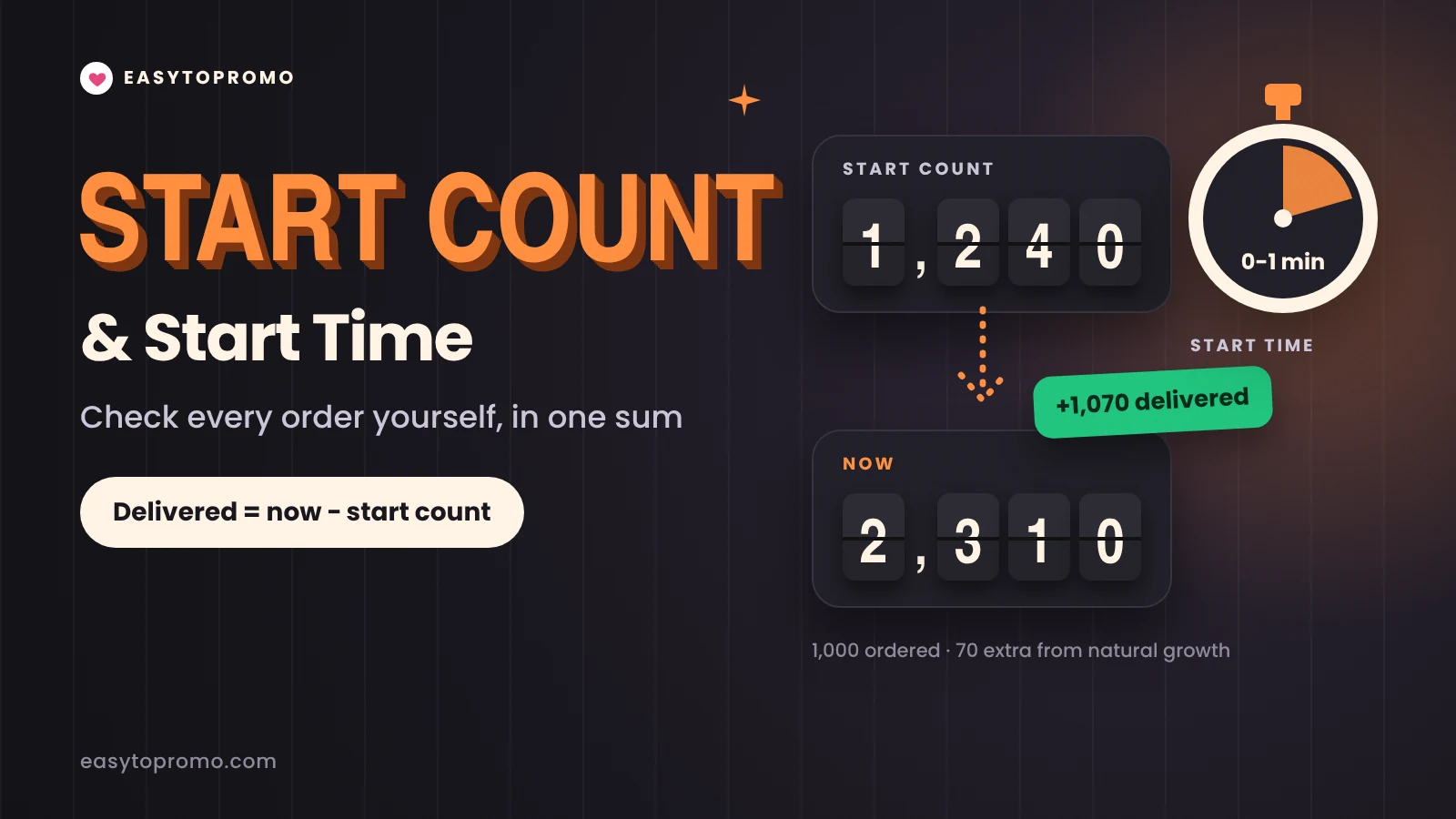
Think of it as a "before" photo. If your profile had 1,240 followers when the order started, the start count is 1,240. Everything delivered after that is measured from this number.
Why the Panel Records It
Start count does three jobs:
It measures delivery. The panel compares the current count with the start count to track how much has arrived.
It decides refills. If the count later falls below what you should have, panels usually use the start count to work out how much to refill.
It settles disputes. If you think an order fell short, the start count is the first thing support will check.
What Is Start Time?
Start time is how soon delivery usually begins after you place the order. You will find it in the service description, and it varies a lot from service to service.
Start time is not the same as how long the order takes. Indian followers can start within 30 minutes and still take more than a day to finish. Our guide on how to read an SMM panel service listing explains the difference between start time and average time with real examples.
How to Check How Much Was Delivered
You do not need to trust the panel blindly. A simple sum tells you what arrived.
Delivered = current count − start count
A Worked Example
You order 1,000 followers.
The start count in your order history shows 1,240.
When the order shows Completed, your profile shows 2,310.
2,310 − 1,240 = 1,070.
You received at least the 1,000 you ordered. The extra 70 most likely came from people who found your profile on their own during delivery.
When the Sum Looks Wrong
Sometimes the numbers will not match exactly. These are the usual reasons:
Natural growth or loss. Real people follow and unfollow you while the order runs, so the count moves on its own.
Rounded numbers. Large counts are often shown rounded, such as 12.4K. Check the exact number before you compare.
Delayed counts. Some platforms update public counts with a delay, so wait a few hours after completion before you check.
Drops from older orders. If an earlier order is still losing a few followers, it can hide part of the new delivery.
Hidden counts. If you hide like or view counts, neither you nor the panel can measure the order properly. Keep counts visible until delivery finishes.
Why Start Count Matters for Refills
Refills replace units that disappear after delivery. To know how many disappeared, the panel looks at the start count plus the quantity you ordered.
For example, with a start count of 1,240 and an order of 1,000, you should have about 2,240. If the profile later falls to 2,050 within the refill period, about 190 have dropped, and a refill can replace them. Our guide on how refills work shows how to request one.
This is also why you should never place two orders on the same link at the same time. Our FAQ says you can order for the same link twice, but you "have to wait for the current order to get completed" first. Two open orders share one count, so neither start count is reliable.
What to Do When an Order Has Not Started
An order showing Pending has been received but has not started yet. Before you worry, work through these checks.
Compare with the listed start time. A watch-hours order with a start time of up to 2 hours is not late after 30 minutes.
Check that the account or post is public. Orders cannot start on private accounts.
Open your link in a private browser window. If it does not load, the panel cannot deliver to it. Our SMM panel link guide shows the right link for every service.
Make sure no other order is running on the same link.
Contact support if it is well past the estimate. Our FAQ says: "If your order is delayed well beyond the estimated time, feel free to contact the EasyToPromo support team." Include your order ID.
Tips to Avoid Start Count Problems
Keep the account public and the counts visible until the order completes.
Do not change your username or delete the post during delivery.
Note your count before ordering, so you can double-check the start count.
Wait for one order to finish before placing the next on the same link.
Use drip-feed delivery for big orders, so each smaller run starts from a clear count.
If any term here is new, our SMM panel glossary explains more than 60 of them.
You can see the start time for every service on our SMM panel India site before you order.
Frequently Asked Questions
Where can I see the start count of my order?
In your order history, next to the order. The panel records it when delivery begins, so it may be empty while the order is still Pending.
Why is my start count higher than my real follower count?
The count can change between the moment you checked and the moment delivery began, for example if other people followed you. Small differences are normal. Contact support if the gap is large.
Is start time a guarantee?
No. It is the usual time delivery begins for that service. Busy periods and large orders can start later.
Does the start count change during delivery?
No. It stays fixed at the number recorded when the order began. Only your live count on the platform keeps changing.
Can I hide my like count while an order is running?
It is best not to. Hidden counts make it hard for the panel and for you to check delivery. Turn them back on until the order completes.